Serverless Workers
This page covers the following:
- What is a Serverless Worker?
- How Serverless invocation works
- Autoscaling
- Scaling with long-lived Workers
- Worker lifecycle
- Failure handling
- Constraints
- Worker Versioning with Serverless Workers
What is a Serverless Worker?
A Serverless Worker is a Temporal Worker that runs on serverless compute instead of a long-lived process. There is no always-on infrastructure to provision or scale. You configure a compute provider, and Temporal starts and stops Workers in response to work on a Task Queue.
A Serverless Worker uses the same Temporal SDKs as a traditional long-lived Worker, and registers Workflows and Activities the same way. What differs is that Temporal manages the Worker's lifecycle rather than you running a Worker process. How that lifecycle works depends on the compute provider: AWS Lambda runs short-lived invocations, while GCP Cloud Run runs a pool of long-lived instances. See Worker lifecycle.
Serverless Workers require Worker Versioning. Each Serverless Worker must be associated with a Worker Deployment Version that has a compute provider configured.
To deploy a Serverless Worker, see Deploy a Serverless Worker.
Compute providers
A compute provider is the configuration that tells Temporal how to invoke a Serverless Worker. The compute provider is set on a Worker Deployment Version and specifies the provider type, the invocation target, and the credentials Temporal needs to trigger the invocation.
For example, an AWS Lambda compute provider includes the Lambda function ARN and the IAM role Temporal assumes to invoke it. A GCP Cloud Run compute provider includes the Worker Pool's project, region, and name, and the service account Temporal impersonates to scale it.
Compute providers are only needed for Serverless Workers. Traditional long-lived Workers do not require a compute provider because the Worker process lifecycle is not managed by the Temporal server.
Temporal supports two compute providers:
| Provider | Description |
|---|---|
| AWS Lambda | Temporal assumes an IAM role in your AWS account to invoke a Lambda function. |
| GCP Cloud Run | Temporal manages Cloud Run instance scaling through the Cloud Run admin API. |
How Serverless invocation works
With long-lived Workers, you start the Worker process, which connects to Temporal and polls a Task Queue for work. Temporal does not need to know anything about the Worker's infrastructure.
With Serverless Workers, Temporal starts the Worker.
Worker Controller Instance
The Worker Controller Instance (WCI) is a system Workflow that scales Serverless Workers based on Task Queue conditions. One WCI Workflow runs per Worker Deployment Version that has a compute provider configured. The WCI runs in the same Namespace as your Worker Deployment.
The WCI adjusts the Worker count based on Task Queue conditions. Sync match failures and Task Queue backlog signal that more capacity is needed, and the WCI adds Workers by triggering the configured compute provider. It also removes capacity as work drains. How often the WCI re-evaluates the count, and how it sizes the pool, depends on the compute provider. For details, see Autoscaling.
You can list WCI Workflows in your Namespace:
temporal workflow list \
  --namespace <NAMESPACE> \
  --query 'TemporalNamespaceDivision = "TemporalWorkerControllerInstance"'
WCI Workflow IDs follow the pattern temporal-sys-worker-controller-instance:<deployment-name>:<build-id>. You can
inspect a WCI Workflow's history to see its recent Activity results:
temporal workflow show \
  --namespace <NAMESPACE> \
  --workflow-id 'temporal-sys-worker-controller-instance:<DEPLOYMENT_NAME>:<BUILD_ID>'
The following diagram illustrates the invocation flow of a Serverless Worker.
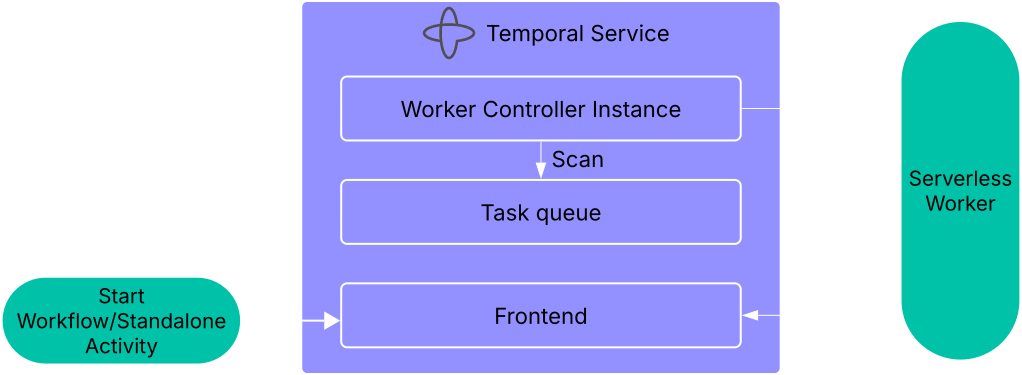
Temporal's Worker Controller Instance invokes a Serverless Worker when Tasks arrive on a Task Queue with a compute provider configured.
The invocation flow works as follows:
- A Task is submitted (for example,
StartWorkfloworScheduleActivity). - The Matching Service attempts to route the Task directly to an available Worker (a sync match).
- If a Worker is available, the Task is routed to that Worker.
- If no Worker is available (sync match fails), the Matching Service pushes a signal to the WCI, and the WCI triggers the configured compute provider to start a Worker.
- The Serverless Worker starts, creates a Temporal Client, and begins polling the Task Queue.
- The Worker processes Tasks from the Task Queue.
Sync match failure is only one of the signals the WCI acts on. It also reacts to Task Queue backlog, and depending on the compute provider it periodically re-sizes the pool based on the rate of arriving work. What the WCI monitors and how it scales differ by provider. See Autoscaling.
Whether a Worker handles a single burst of Tasks and exits, or stays running to process Tasks over a long lifetime, depends on the compute provider's execution model. See Worker lifecycle.
Autoscaling
The WCI automatically scales Serverless Workers up and down based on Task Queue conditions, including sync match failures and Task Queue backlog. The autoscaling algorithm differs by compute provider because of differences in cold start latency, invocation duration limits, and provider APIs. Refer to the autoscaling section for your compute provider:
Scaling with long-lived Workers
Serverless Workers can share a Task Queue with long-lived Workers. Because Serverless Workers are only invoked on sync match failure, Serverless Workers only pick up Tasks that no long-lived Worker was available to handle. In practice, the Serverless Workers act as spillover capacity for the long-lived fleet.
If you configure Serverless and long-lived Workers on the same Task Queue, do not enable dynamic scaling on the long-lived Workers. The two groups cannot coordinate their scaling behavior. If both scale dynamically, the long-lived Workers may scale up to handle the same Tasks that Temporal is simultaneously invoking Serverless Workers for, leading to unnecessary invocations and unpredictable scaling.
Worker lifecycle
How a Serverless Worker starts, processes Tasks, and shuts down depends on the compute provider's execution model: short-lived invocations on AWS Lambda, or long-lived pool instances on GCP Cloud Run. Refer to the lifecycle section for your compute provider:
Failure handling
Serverless Workers rely on Temporal's standard retry and timeout semantics to recover from failures. The following sections describe common failure scenarios and how they are handled.
Worker crash
If a Worker crashes (out of memory, unhandled exception, etc.), the behavior follows standard Temporal retry semantics:
- The Activity Timeout fires after the configured duration.
- Temporal retries the Activity on another Worker.
- No manual intervention is required.
Provider concurrency limit
If the compute provider's capacity limit is reached (for example, AWS Lambda account concurrency or a GCP Cloud Run maximum instance count):
- The WCI cannot add Workers beyond the limit.
- Tasks remain in the Task Queue backlog. No data loss occurs.
- Processing slows until capacity frees up.
Resource exhaustion across Activity slots
By default, a single Worker may run multiple Activity slots. A crash or resource exhaustion in one Activity (for example, out-of-memory from a memory-intensive operation) can affect other Activities running on the same Worker.
To isolate Activities from each other:
- Split Workflow Workers and Activity Workers into separate Worker Deployments.
- Set Activity slots to 1 per Worker.
With single-slot configuration, each Activity gets a dedicated execution environment.
Constraints
| Constraint | Detail |
|---|---|
| Activity duration | Depends on the compute provider. On AWS Lambda, an Activity must finish within the invocation limit (15 minutes maximum), minus the shutdown deadline buffer. On GCP Cloud Run, instances are long-lived, so no per-invocation limit applies. See Worker lifecycle. |
| Workflow duration | No limit. Workflows of any duration work. A Workflow runs across as many Workers as needed. |
| Worker code | Same Temporal SDK Worker code, using the serverless Worker package for your SDK. |
| Versioning | Worker Versioning is required. Each Workflow must have an AutoUpgrade or Pinned behavior, set per-Workflow or as a Worker-level default. See Worker Versioning with Serverless Workers. |
Worker Versioning with Serverless Workers
Serverless Workers require Worker Versioning, and the compute provider must invoke a stable, immutable build for each Worker Deployment Version. How Worker Deployment Versions map to compute provider primitives differs by provider. Refer to the versioning section for your compute provider: